
How to Create Realistic UGC Content with AI: Step-by-Step Guide for Beginners
Want to create high-quality UGC videos without showing your face, buying expensive equipment, or even having the product physically in your hands? You’re in the right place!
Thanks to artificial intelligence, creating realistic user-generated content (UGC) has become easier and more accessible than ever. Whether you’re looking to become a UGC creator, land brand collaborations, promote affiliate products, or create engaging content for your own business, AI can help you achieve professional-looking results without spending hours filming and editing videos.
And the best part? You don’t need any previous content creation experience to get started.
In this beginner-friendly tutorial, I’m going to walk you through the exact 3-step AI UGC content creation strategy I personally use to generate realistic product images and turn them into videos using OpenArt AI.
Let’s get into it!
What Is AI UGC Content?
AI UGC (Artificial Intelligence User-Generated Content) refers to content created or enhanced using artificial intelligence to resemble authentic, creator-style product content.
Traditionally, UGC creators film themselves demonstrating, reviewing, or promoting products for brands.
However, with AI tools, you can create realistic product photography, virtual models, lifestyle images, and promotional videos without necessarily appearing on camera yourself.
For example, imagine you want to create a skincare advertisement.
Instead of setting up lighting equipment, hiring a model, or filming multiple videos, you can upload a product image into an AI platform, generate a realistic lifestyle image, and animate it into a short promotional video.
That’s exactly what I’m going to show you how to do!
AI UGC content can be used for:
- Instagram Reels and TikTok videos
- Product advertisements and promotional campaigns
- Affiliate marketing content
- E-commerce product demonstrations
- Social media content for businesses
- Brand pitches and creative portfolios
While AI-generated content isn’t a substitute for genuine customer testimonials, it can be a powerful way to create original, UGC-style marketing visuals.
Can You Really Make Money as an AI UGC Creator?
Yes! There are opportunities to monetise AI-assisted content creation, particularly if you develop strong creative skills and produce content that businesses find useful.
Brands need engaging content to promote their products online. Some are open to working with creators who can produce realistic AI-generated product visuals and advertising assets.
As an AI UGC content creator, you could potentially earn money by creating promotional content for brands, offering AI content creation services, producing affiliate marketing videos, or using AI-generated visuals to market your own products.
For example, I use AI-generated content to promote products for my skincare brand, Skin Beauty, and to create content for affiliate marketing.
This allows me to experiment with different creative ideas without needing a large production budget.
However, getting paid isn’t automatic. Your earning potential depends on your portfolio, the quality of your content, your ability to find clients, and whether brands are interested in the services you offer.
My advice? Focus on learning the skill first. Once you can consistently create high-quality content, you can start exploring ways to turn that skill into an income stream.
How to Start AI UGC for Beginners: My 3-Step Strategy
If you’re completely new to AI content creation, don’t worry.
You don’t need to understand complicated technology or invest in expensive cameras to get started.
Here’s the simple strategy I use.
Step 1: Choose the Right AI UGC Creator Tool
The first thing you need is reliable AI software.
There are several AI content creation tools available, but one platform I’ve personally been using is OpenArt AI.
OpenArt is an AI-powered creative platform that allows you to generate images and transform images into videos.
What I particularly love about OpenArt is that I can create realistic product images and then bring those images to life without having to switch between multiple platforms.
For someone learning how to create UGC content with AI, that’s incredibly helpful.
Some of the reasons I enjoy using OpenArt include:
- Creating realistic lifestyle and product images.
- Uploading reference images to guide content generation.
- Experimenting with different visual styles and settings.
- Turning still images into engaging video clips.
- Creating content for skincare, beauty, fashion, and other product niches.
Instead of creating content entirely from scratch every time, you can use your existing product images as the starting point.
👉 [Try OpenArt AI Here for an amazing deal]
If you’re looking for the best AI UGC creator for beginners, I recommend exploring a platform that supports both image generation and image-to-video creation. OpenArt is one option worth considering, especially if you want to experiment with both features in one place.
Step 2: Research High-Performing UGC Content and Create Realistic AI Images
Now that you’ve chosen your AI software, it’s time to create your first piece of content.
But before you start generating images, there’s something important I recommend doing.
Research what’s already working on social media.
This is one of the biggest tips I can give anyone learning how to start AI UGC for beginners.
Instead of randomly generating content and hoping people will like it, look for inspiration from videos and images that are already attracting attention.
Here’s how I do it.
1. Find inspiration on social media
Head over to platforms like Instagram, TikTok, or Pinterest.
Search for content in the niche you’re interested in.
For example, if you’re creating UGC for a facial cleanser, you might search for:
- Skincare product photography
- Skincare UGC videos
- Facial cleanser aesthetic
- Skincare product demonstrations
- Beauty product advertising
Look at the styles, camera angles, lighting, and backgrounds creators are using.
Pay attention to posts that receive strong engagement, but remember that lots of views or likes don’t necessarily mean a video generates sales.
The goal here is to understand what types of visuals appeal to your target audience.
2. Save reference images
Once you find content you like, save a few reference images for inspiration.
Now, here’s something important.
We’re not copying another creator’s entire image or using someone’s face without permission.
We’re simply studying the creative elements, such as the lighting, composition, background, or product positioning, and then developing our own original content.
For example, you might find an image of someone holding a skincare product against a beautiful neutral background.
You could use the overall style as inspiration while creating a completely different image featuring your own product, composition, and setting.
3. Upload your product image into OpenArt
Next, open your OpenArt account and choose an appropriate image-generation workflow.
Upload your product image and, where supported, add a reference image to guide your desired style.
If you’re promoting your own product, you can use a photo you’ve taken yourself or an image from your website.
If you’re creating content for another brand, make sure you have permission to use its product imagery for your intended purpose.
4. Write a detailed AI prompt
This is where the magic happens! One thing I’ve learned from using AI is that the quality of your prompt can make a huge difference to the final result.
A vague prompt such as “Create a beautiful skincare image” might produce something generic.
Instead, describe exactly what you want.
Here’s an example.
Example AI UGC image prompt:
“Create a hyperrealistic lifestyle product photograph featuring a luxury facial cleanser in a softly lit modern bathroom. Show a natural-looking hand gently holding the product, with realistic skin texture, warm morning sunlight, neutral beige tones, elegant bathroom decor, and professional beauty campaign photography. Maintain accurate product packaging, realistic proportions, and natural shadows. Vertical 9:16 composition for social media.”
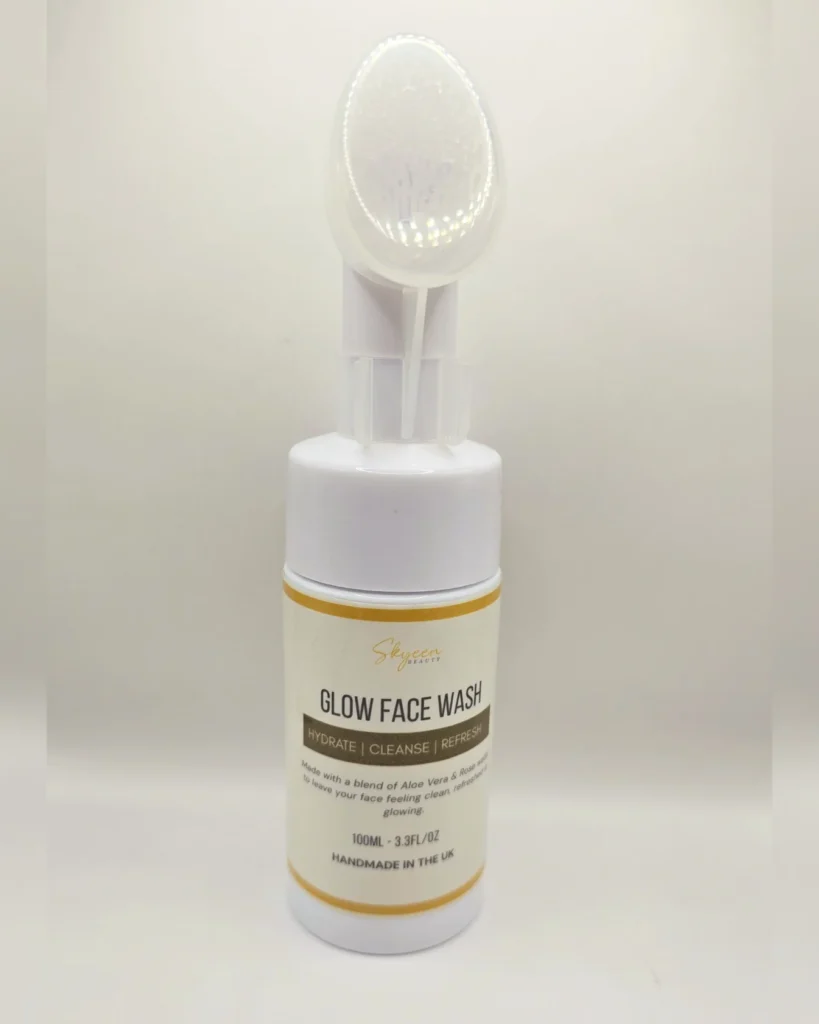
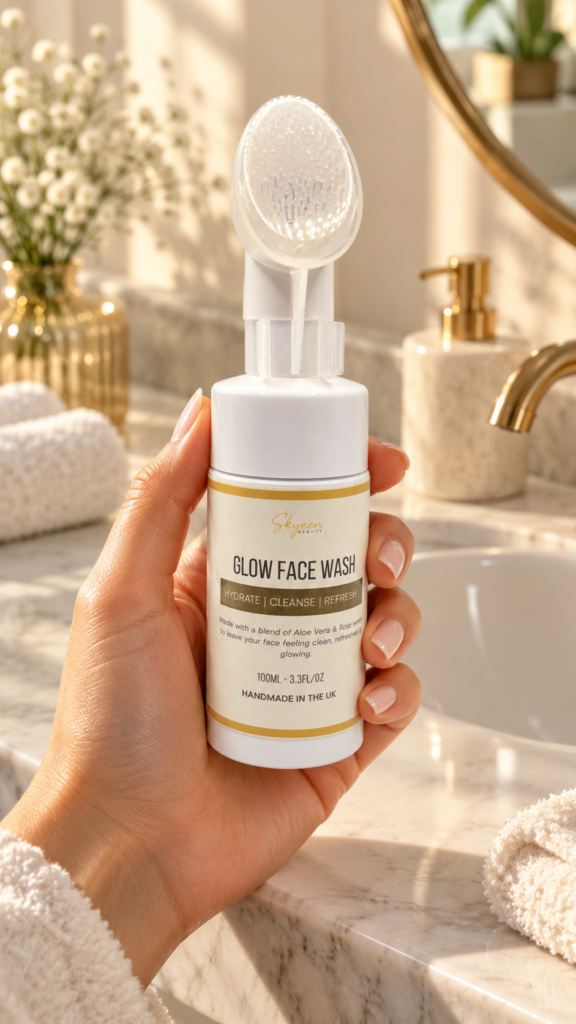
Notice how this prompt includes specific details about the environment, lighting, camera composition, and overall aesthetic?
These details help the AI understand the result you’re trying to achieve.
If your first image doesn’t look right, don’t give up!
Sometimes you’ll need to adjust your prompt several times to get the result you’re looking for.
Want more AI prompts? Join the AI Community Here to Learn More AI Skills
I’ve put together a FREE AI UGC checklist featuring the prompts and resources I personally use to create content.
👉 [DOWNLOAD MY FREE UGC CHECKLIST – INSERT LINK]
Step 3: Turn Your AI Images into Realistic UGC Videos
Once you’ve created a beautiful product image, it’s time for my favourite part.
Turning that image into a video!
This is one of the reasons I enjoy using OpenArt for AI UGC content creation. Instead of stopping at a static image, you can use its image-to-video functionality to animate the image and produce a short video clip.
Here’s the process.
1. Open the image-to-video feature
Inside OpenArt, select the image-to-video workflow and upload your generated product image.
2. Describe the movement you want
Next, create a prompt that explains how the image should move.
For example:
Example AI UGC video prompt:
“Create a realistic skincare product advertisement from this image. The hand gently rotates the facial cleanser bottle toward the camera while natural sunlight softly illuminates the packaging. Add subtle camera movement, realistic hand motion, soft shadows, and a premium beauty advertisement aesthetic. Maintain consistent product details and natural-looking movement.”
This gives the AI guidance on the movement and visual style.
3. Generate and review your video
Once you’ve submitted your prompt, generate your clip and review the result.
Pay close attention to the product label, hands, packaging, and overall realism.
AI isn’t perfect, and sometimes it can distort objects or create unnatural movements.
If that happens, adjust the prompt or try another generation.
4. Prepare the content for social media
Once you’re happy with your video, you can download it and prepare it for publishing.
Depending on your goals, you might add background music, captions, product benefits, or a call to action.
And just like that, you’ve created a piece of AI-assisted UGC-style content without filming yourself!
You can use this approach for TikTok videos, Instagram Reels, brand portfolios, or your own product promotions.
Why AI UGC Content Creation Is Worth Learning
Personally, one of the biggest benefits of learning AI content creation has been the flexibility it gives me.
As a business owner, I understand how expensive professional content creation can become.
Between product photography, models, equipment, lighting, and editing, costs can add up quickly.
Using AI helps me experiment with new content ideas, create promotional visuals, and produce marketing assets without organising a full photoshoot every time.
And the same skill can be useful beyond UGC.
You could use it to create website banners, social media graphics, product promotions, affiliate content, or advertising concepts.
It’s a creative skill that can support several different types of online businesses.
Common Mistakes to Avoid When Creating AI UGC Content
Before you start, here are a few mistakes I recommend avoiding.
Using vague prompts: The more clearly you describe your desired output, the easier it becomes to guide the AI toward a useful result.
Expecting every generation to be perfect: AI tools can make mistakes. Be prepared to test different prompts and refine your images.
Ignoring product accuracy: Always check that the product packaging, labels, colours, and important details are represented correctly.
Copying other creators: Use reference images for inspiration, not to reproduce someone’s protected work or likeness without permission.
Making misleading claims: Don’t create fake customer testimonials, pretend to have personally used a product you haven’t tried, or make unsupported claims about results.
Assuming AI guarantees brand deals: Creating impressive visuals is only one part of building a successful content creation business. You’ll also need a portfolio, client outreach, and an understanding of what brands need.
Frequently Asked Questions About AI UGC for Beginners
Can I create UGC content with AI without showing my face?
Yes! You can use AI tools to create product lifestyle images, animated product videos, and virtual models without appearing on camera yourself. This can be especially useful for people interested in faceless content creation.
What is the best AI UGC creator for beginners?
The best AI UGC creator depends on your goals, budget, and the type of content you want to make.
I personally use OpenArt because it gives me options for generating realistic images and turning them into videos.
If you’re just getting started, I recommend choosing one tool and learning how to use it properly before investing in multiple platforms.
Do I need to buy products to create AI UGC content?
Not always. You can generate content using product images you already own or are authorised to use.
However, if you’re creating promotional content for a brand, make sure you have the necessary permissions and accurately represent the product.
Can I use AI UGC for affiliate marketing?
Yes, provided the content complies with the affiliate programme’s rules, advertising requirements, and the platform’s AI-content policies.
You can create promotional visuals for affiliate products, but you should never imply that you’ve personally tested a product if you haven’t.
Can beginners make money creating AI UGC content?
It’s possible to earn money by offering AI-assisted product content creation services to businesses, building a portfolio, or using the content to support affiliate marketing.
However, income isn’t guaranteed. Success depends on your skills, clients, marketing efforts, and the value of the content you create.
Is OpenArt good for AI UGC content creation?
OpenArt is a useful option for people who want to generate AI images and experiment with image-to-video creation.
I particularly enjoy using it to create skincare and product-focused content for my business.
As with any AI software, results can vary depending on your prompts, reference materials, and the generation models you choose.
Final Thoughts: Start Creating Realistic UGC Content With AI Today
If you’ve been thinking about getting into content creation but the thought of constantly filming yourself has been holding you back, I hope this guide has shown you another option.
You don’t need to be a professional videographer to start experimenting with AI UGC content.
With the right tools, a little creativity, and some practice, you can learn how to create realistic product images and turn them into engaging promotional videos.
My biggest advice is to start simple.
Choose one product, research a few content ideas, create your first AI image, and practise turning it into a video.
The more you experiment, the more comfortable you’ll become with the process.
And if you want to follow along with my exact workflow, I’ve created a step-by-step YouTube tutorial showing you how I personally use AI to create UGC-style content.
🎥 WATCH THE FULL VIDEO: How to Use AI to Create UGC Content
Have you tried creating AI UGC content yet? Let me know in the comments!
Disclosure: This article may contain affiliate links. If you purchase through one of these links, I may earn a commission at no additional cost to you. Some examples discussed in this article use AI-generated content.